The Japandi Smart Home: How to Integrate Tech That Disappears
Walk into any home embracing the Japandi movement—the gorgeous design intersection where Japanese wabi-sabi simplicity meets Scandinavian warmth and functionality—and you will immediately feel a sense of stillness. The palette is organic, the lines are low-slung and clean, and every object is placed with deep intention.
But introduce modern smart home technology into this mix, and that hard-won harmony can vanish in an instant. Glowing blue LED status lights, bulky plastic adapters protruding from outlets, and cluttered tabletop hubs easily turn a serene sanctuary into a chaotic electronics showroom.
The secret to building a successful Japandi smart home lies in invisible intelligence: designing a home that works for you silently in the background without drawing attention to the hardware. By applying architectural principles to your tech stack, you can create a home that is both highly automated and beautifully designed.
Here is the design-first playbook for integrating smart technology into a Japandi interior, drawing from real homeowners who have successfully bridged the gap.
The Core Philosophy: Smart Infrastructure, Dumb Appliances
When planning a smart home, the temptation is to buy "smart" versions of everything—from your kettle to your toaster to your trash can. But this approach is both an aesthetic and technical mistake.
A far more elegant design principle is the "smart infrastructure, dumb appliances" philosophy. Instead of cluttering your kitchen countertops with gadgetry, focus your smart integration entirely on the home’s bones:
- Smart Switches: Controls the electricity flowing through your walls.
- Smart Lighting: Modulates the atmosphere and color temperature of the room.
- Smart Climate & Shade Control: Regulates temperature and natural light automatically.
By making the wiring smart, you can keep your appliances simple, reliable, and beautifully analog. You do not need a smart kettle when a designer copper gooseneck kettle on a simple cooktop fits your wabi-sabi styling infinitely better.
Bypassing the "IKEA Plug" Problem
One of the most common pitfalls of DIY smart home setups is the reliance on smart plug adapters. Homeowners buy a standard floor lamp, plug it into a smart adapter, and plug that adapter into the wall.
While this works in theory, it introduces two major issues in a minimalist home:
- Visual Clutter: The bulky plastic block breaks the clean line of your baseboards and draws the eye to the outlet.
- The "Bro, No Go" Friction: If a family member or guest accidentally flips the physical wall switch off, the smart plug loses power entirely and goes offline.
This friction is what smart home designers call the "IKEA plug" problem. The solution is to skip plug-in adapters entirely and install in-wall smart relays (such as Shelly or Aqara modules) behind your traditional light switches, or to replace the switches themselves with dedicated smart wall switches. This ensures that the physical switch always works, the smart system remains online, and the technology stays completely hidden inside your walls.
Tactile Design: Selecting the Right Smart Switches
Japandi design emphasizes touch and natural texture. When you interact with your home, the sensation should feel premium and satisfying. Your light switches are the primary physical point of contact with your home's intelligence—they should not feel like cheap plastic toys.
When choosing hardware, prioritize tactile materials like metal, wood, or matte-textured polymers:
- Koble Smart Switches: Featured in modern BTO flat renovations, Koble's matte white, round-edged switches offer a soft, minimalist profile that blends seamlessly into textured plaster or microcement walls. Their tactile, clicky feel brings back the satisfying feedback of a traditional switch.
- Lutron Palladiom: For a high-end architectural finish, the Palladiom series offers flush-mounted buttons in real metal (brass, bronze, chrome) and glass. The buttons sit perfectly level with the wall plate, eliminating all unnecessary visual depth.
- Buster + Punch: If your minimalist aesthetic leans slightly industrial, Buster + Punch's solid metal toggle switches provide a heavy, textured knurled feel that turns turning on a light into a luxury experience.
For more tips on choosing switches that complement your interior design, read our guide to minimalist smart locks or check out our review of high-design smart lighting upgrades under $100.
Calm Automation: Routines That Ease the Day
A true smart home does not require you to constantly open apps or talk to voice assistants. Instead, it runs on pre-programmed routines that mirror your daily habits. For a minimalist layout, focus on three essential routines:
1. The Entryway "Kill Switch"
Place a single master switch by your front door. When pressed on your way out, it executes a "Goodbye" protocol—turning off every single light, fan, and climate control system in the house. This eliminates the need to run through the house checking rooms (often with your shoes already on) and ensures your utility bill stays low.
2. The Morning "Boot Up"
Activate this routine with a single press or a motion trigger in the kitchen. It gently raises your smart shades, slowly ramps up your main lights to a cool white to promote focus, and turns on your smart-plugged audio system to play a soft morning playlist.
3. The Evening "Wind Down"
An hour before bed, this protocol transitions your living space into a restorative retreat. It turns off all bright overhead fixtures, activates soft ambient under-cabinet or baseboard lighting, and shifts the color temperature of your smart bulbs to a warm, cozy yellow (2200K–2700K).
Real Homeowner Inspiration
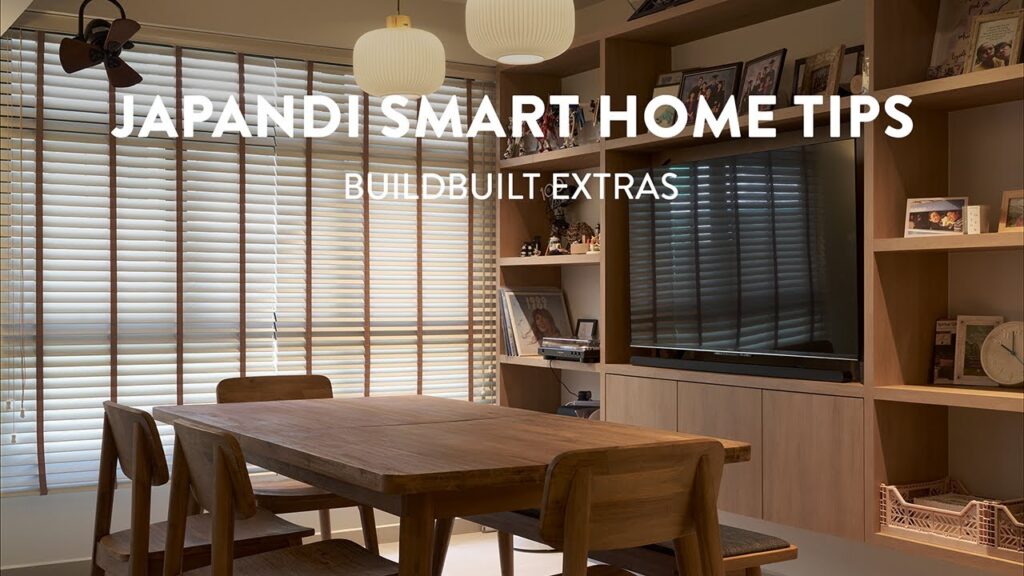
To see these design and automation principles in action, watch this full tour of a completed Japandi smart home. Notice how the homeowners integrated their smart switches to keep their kitchen and living room clutter-free:
The Verdict
Your home is a sanctuary, and the tech you choose should respect that boundary. By focusing on smart infrastructure, investing in tactile switches, and programming silent routines, you can build a Japandi home that is incredibly smart while remaining visually quiet.
- To take your design integration to the next level, read our comprehensive guide on how to hide smart home hubs and wires.*
Frequently Asked Questions
What is the “smart infrastructure, dumb appliances” approach?
It means making your home’s wiring, lighting, and fans smart through built-in smart switches or in-wall relays, while keeping appliances like kettles or coffee makers traditional. This provides automated control without the technical clutter and reliability headaches of multiple smart appliances.
What smart switches fit a Japandi aesthetic?
Look for minimal, tactile switches with soft, rounded edges and clean finishes. Koble offers matte white, round-edged switches that blend beautifully into wabi-sabi plaster walls. For metallic textures, brands like Lutron Palladiom or Buster + Punch offer high-end, architectural profiles.
How do I avoid the “IKEA plug” problem?
The IKEA plug problem happens when you add a bulky smart plug adapter on top of a traditional outlet controlled by a physical switch. If someone flips the physical wall switch off, the smart plug loses power and becomes unresponsive. Using in-wall smart relays (like Shelly or Aqara) or dedicated smart switches prevents this issue entirely.
What are the best automated routines for a minimalist home?
Start with an entryway “kill switch” to turn off all lights and climate systems when leaving. Follow up with a evening “wind-down protocol” that dims main lights and shifts color temperature to warm white to prepare you for sleep, and a morning “boot-up protocol” to transition your space for focus.